Tuesday, March 18, 2008

Feed Me

I was looking forward to learning about RSS feeds, as I first heard about them in the Helene Blowers workshop and thought it might be great.............if only I knew what it was. :P

So here I am and what do you know, Eureka! the dots are finally connected. I now understand what Helen was showing us when she showed us a snapshot of her reader. Though mine sure isn't as populated as hers.

In my attempt to familarise myself with RSS I decided that I was going to created accounts with both bloglines and google reader to find what each offered, and whether readers are generally the same. As general experiments go my conclusions pointed to the obvious, and that is....wait for it...yes, both readers were fairly similar in functionality.

Well, after playing around with both readers (2 minutes each way) I decided to stick with google reader for the simple reason, that I had a gmail account and wanted to keep it all in the same family.

Anyway I'm off to ''explore''".........

Feeds Added:

1. Powerhouse Museum Photo of the day
2. SMH - Entertainment Headlines
3. SMH - News Headlines
4. Powell Books - Blogs
5. Powell Books - Reviews
6. Delicious love hk films
7. Love Kozo (blog)
8. Daily Telegraph - Top stories

I was really excited about adding feeds and selected a few based on keeping up with current events, personal interest and book related feeds. All were quite easy to add, as the RSS feed icon was accessible. To fast forward my usage of google reader I search for a youtube clip to show me other features of google reader. I have added this clip at the end of this post for those who may need to fast track their training as well.

What I particularly liked about google reader was that you can highlight things of interest by adding a star to it. This would then place the item into the 'starred folder' for a more thorough read later on. Another feature was sharing your feeds and trends which allows you to view the amount of activity undertaken in the reader.

What I found disappointing, and this may be something that is possible, but I'm not currently aware of it, is that the added feeds can't be group into folders like bloglines, or even group together into interests. At the moment all my feeds are displayed alphabetically.

Something else I've just realised as well, which has more to do with the management of the reader, and that is, after a few weeks without checking the reader I now have over 1,000 items to read. I don't know how people can have more than 10 feeds via their readers, but it probably didn't help that I added the newspapers headlines.

To better manage this I will restrict my feeds to those that I would consider essential, delete the newspapers feeds, and also incorporate checking my reader as part of my work routine.

*************

How can libraries take advantage of this technology? Our library has incorporated RSS feeds on their library events webpage, book talks and book groups webpages, thus ensuring regulars are always informed on events they are interested in.

Another idea would be to create a general newsreader for all library staff to access on the service desks when quiet, and include feeds to websites which would help them in their learning and development, for example feeds to Readers Advisory blogs and book reviews.

As promised the video that helped me get beyond basics (it's not as good as the commoncraft vids, but still note worthy).

P.S I have also added a feed from my reader to this blog, which I'm proud of.

Wednesday, March 12, 2008

Flickr

My first foray into flickr was when our library hosted the NSW Biggest Book Club in 2007. As decided in the Readers Advisory Working Group any pics taken on the day would be placed on flickr with the tags: readers day and read @ your library. Luckily the process was relatively simple and I was able to add the pics without too much fuss.

I think what other libraries are doing with flickr are great I particularly like the photographic competitions for teens at Lansing Public Library. Its a great idea to interest teenagers and I wish our library can do something similar. This sort of project reminds me of another great program, I think it was from the Helene Blowers workshop where a library or groups of libraries ran a video comp for teens to make a video about libraries. The winning entry was showcased on MTV, which must have been a great media opportunity for the libraries involved.

Did anyone else remember Helene Blowers mentioning this?

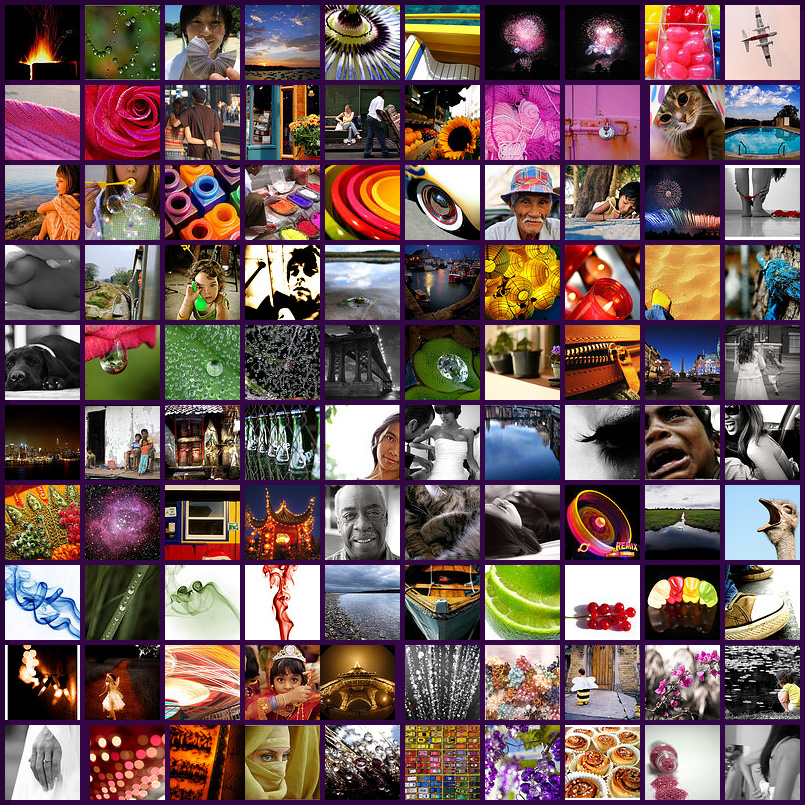
As part of the 'explore' activity I jumped onto flickr and started looking around for an interesting picture to discuss, but there's so many fantastic pictures, finally I settle on this gorgeous mosiac, which was created from the author's favourite pics. I think this is a stunning tapestry of other artists works.

What I love about this is the arrangement of colours, the diversity of subjects, the simplicity of a form shot from a different perspective.

I located this picture by doing a search under the word ''Flickr''. I was curious as to what pictures would have this tag, and this was one of them. Wonderful isn't it, I wish it was available as a poster I would definitely purchase it. Another reason why I picked this is that there's so much there to view that it would take more than one sitting to truly appreciate the beauty of it.

I've noticed that tags have become increasing more popular with social websites, particularly those with huge virtual communities. I think tags are great, even though there is a commonly acknowledged problem with the semantics of tags, they are needed to help drill down to a subject/content, and the benefits are that, more than one tag can be applied to an item. Allowing more chance for the content/subject to be accessed.

Well I'm off to upload pictures of my library with the tags: nswpln2008.

Tuesday, March 4, 2008

What's your social networking personality?

Sometime last week I read in a newspaper that teens between the age of 18-25 yrs? have less time for TV, it mentioned that teens have replaced TV with social networking sites like Facebook or Bebo and their mobiles, texting.

I'm pretty disappointed that I can't seem to lay my hand on the article again, but it also mentioned that researchers have defined users into five categories, and I am curious to find out which one I represent. So if you know the article, let me know, or send me a link. More importantly it validates the reason why so many of us are doing this learning 2.0 course. For libraries to stay relevance in a changing landscape, we need to be able to understand our community and the impact of emergent technologies.

So please let me know if you remember reading about this.

Friday, February 29, 2008

The Others....part 2

I knew there was something I forgot to mention. I was supposed to answer the following questions, What other blogs have you discovered? What do you like about them?

Ok, well being new to this whole blogosphere, I decided to check out blogs of note and thought I list down some noteworthy blogs that I've come across.

http://www.foodmayhem.com
I thought this food blog was great, not only did it have recipes but their commentary was personable, informative and interesting to say the least. I also like how they have a button called 'mayhem' when you click on it, it brings up random posts, which I think is a great idea if you have been blogging for awhile, and have built up your archive and would want to highlight some great past posts.
They also have scrumptious pictures of their recipes, which is an absolute must for any foodie blog! Also check out the recipe for Emeril's Banana Cream Pie, I drooled over this and not being the greatest cook, I have to be satisfied with looking at the picture every now and then, until I bribe one of my friends to make it for me. :)

http://boingboing.net
Boing Boing is a weblog of cultural curiosities and interesting technologies. Their layout wasn't visually impressive, considering it ranked top 5 for Technorati, however they do have funny posts from crow vending machines to how mushrooms can save the world. They also discussed Neil Gaiman's new book 'American Gods', how the publishers release it for free online, and why they don't think the experiment worked.
What I also like is that they have their own TV show for their blog, impressive as well as the amount of info that is on there!

http://www.theshiftedlibrarian.com
A "shifted librarian" is someone who is working to make libraries more portable.

A worthwhile blog to read, a librarian passionate about technology and the application of them in libraries. Provides a good insight on the latest technological advancement in libraries but not restricted to them. Recommended read on the blog: What is the shifted librarian.
I also like that access to the blog archives are done via a calendar (picture link) than a word link. I didn't think much of the template selected, for a technology driven blog I thought it was a bit dated and it could be better structured for readability.

http://libraryrevolution.com
Another library driven blog which in comparison to 'the shiftedlibrarian' was much easier to navigate, thanks to structure of the text and a good layout. Library revolution is all about the ways in which we can take what we do well in libraries and do it better.
I really like the 'cluster cloud' which are tags arranged within a box, as well as the 'twitter' which is something like short random comments on anything. I also really like the Clustr Maps, which shows the location of all visitors on a world map, interesting to see that the North Island of New Zealand had more of a concentration on people viewing this blog moreso than their Sydney counterparts.

Okay well I looked twitter up and here's what it says....Twitter is a service for friends, family, and co–workers to communicate and stay connected through the exchange of quick, frequent answers to one simple question: What are you doing?

Hmm I've also been hearing about widgets, my understanding of them after hitting up Wikipedia is that they are third party apps, sort of like small contained programs which can be embedded into other programs. I wonder whether it will be included in the learning 2.0 subject list?

Unfortunately they don't seem to be included, mental note to myself must explore widgets and see whether I can include some on my blog.

Well that's all for now about other blogs, I'm off to do week 3 program: Flickr.

Thursday, February 28, 2008

The Others....

There are some seriously cool blogs out there from really interesting people. To me the real question is, are people really that exciting. I feel that I would have a difficult time maintaining a blog, and I probably get to the stage where I will stop doing it. At this point in time, blogging or posting is hard.

It's not the technology side, I enjoy playing around and adding slide shows and youtube links, and messing around with making my blog look visually exciting, it's writing down what I think. I don't know why this is such an effort, maybe some of it can be attribute to never being a diary person. I mean I never kept one, to me there is always the possibility of someone in your family reading your secrets.

My life seems boring in comparison. According to my resume.... I have hobbies.... I have friends, but my days seem to involve around work and movies. There's nothing I love more than to relax in front of a huge LCD or plasma screen and watch a good movie.

What type of movie you ask? Well I like all sorts, action, drama, kids, comedy, romance. I enjoy most of them except for political and war movies.

Oh well, I'm off to view more blogs, comment on them and see what exciting lives people lead.

Beyond Intro

Sooooo....Why am I here? What do I hope to learn from this program?

Well firstly I thought the first clip from week 1: the machine is us/ing us was great. It was very clever, fast paced, visually exciting, concept loaded and in a sense a wake up call to the evolving world online. Feeling a bit out dated and yet excited knowing that the concepts introduce in the clips were those that I was going to discover through the Learning 2.0, I waited with bated breath for the explore and adventure exercises to begin.

With the Stephen Fry clip, I'm almost embarrassed to say that I didn't know anything about him, certainly knew nothing about the many roles he had undertaken in his life, as an actor, English Comedian, Columnist and much more including of course being a "Digital technology" enthusiast, so what do you do when you have no idea? I wiki him of course. Yes I have begun to rely on wiki to fill in the missing gaps in my knowledge and it's great. I apply this strategy to work, any time I get an information query and I don't have an idea on the event, a person, a concept I use wiki to bring me up to speed.

Getting back to Stephen Fry, his comment about 'the idea that you could lose that moment is completely disappeared' intrigue me, especially in relation to what seem to be the reverse for digital information. It's true that with emergent technologies, instances which Stephen Fry mentioned in the clip will become obsolete, that missed TV series, that old movie favourite, now you can rent it on DVD, check out you tube or other video websites, technology have indeed come a long way.

However when it comes to digital information, this is a different matter, with the transitory nature of web based digital information, the issues related to the preservation of these have prompted a task force to be created. An initial step which they hope would address 'the many preservation issues raised by the rapid proliferation of digital information'. While that moment in time maybe forever captured one way or another, the popularity of the Internet, the speed, the diversity of information, the 'instance-ness' may have contributed to the shorten lifespan on certain information in this case, digital information.

So what do I want to learn from this programme, everything that is on offer plus more from blogs, wikis, podcasts to flickr. I want it all, to viewing how people use these web 2.0 technology to how libraries can use these technologies. As John Stanley would put it 'expectation plus one', slightly applied in a different context but I still think it works.

Till next we chat.

Wednesday, February 27, 2008

Teck a what?

In my attempt to think of a clever and inspired display name and blog title I surfed the net in my quest to find the perfect name to encapsulate the excitement, the technology, the joy and anonymity of becoming a blogger and I think I did.

I initally was going to chose something which reflected my personal life, it would have revealed who I was to colleagues, but I decided I wanted, no needed the cloak of anonymity, to be bold, to be free, to ask, to explore and most importantly to make mistakes and learn from them without fear.

So onwards here I go into the world of Learning 2.0....

Display Name:

Techthusiasm (Tech-thu-si-asm) n.1. Great excitement for or interest in technology. 2. Technology as the source or cause of great excitement or interest. 3. Archaic. Ecstasy arising from supposed possession by technology.Technology fanaticism. 4. Term trademarked by PrismaStar Software to describe enthusiasm about technology.

Blog title:

Teckademics (teck.a.demics)
A higher level learning, thinking, and fine tuning of skills. *Representation of underground Streetracing and skate cultures.

* Though this word is associated with streetracing, I really like the first sentence, a higher level learning, thinking and fine tuning of skills, a meaning to aspire to, especially in the case of web 2.0 technologies.